Know your build cold.
Everything you need to speak confidently about the Exasol Plant Ops Assistant, the architecture and the why behind every decision, the Exasol concepts likely to come up, and crisp answers to the questions that may come up.
Live: plant.appili.dev · GitHub: appilivamsikrishna/plantpulse-ai · Architecture: plant.appili.dev/architecture
The 30-second pitch
“It's a natural-language assistant for plant operations. A plant manager asks in plain English, “which machines need attention today?”, and gets an evidence-backed answer. The key design choice: Exasol does all the analytics. Machine health and risk scoring live in SQL views, and the LLM is a thin, grounded layer that just picks the right view and narrates the rows. Every answer shows the exact SQL and data behind it, so it's auditable, not a black box. It's live on a URL, and there's a glass-box trace that shows how each answer is built.”
Why this framing wins: the focus is Exasol. Lead with “Exasol is the brain,” not “I used a clever LLM.”
Architecture, and the why of each layer
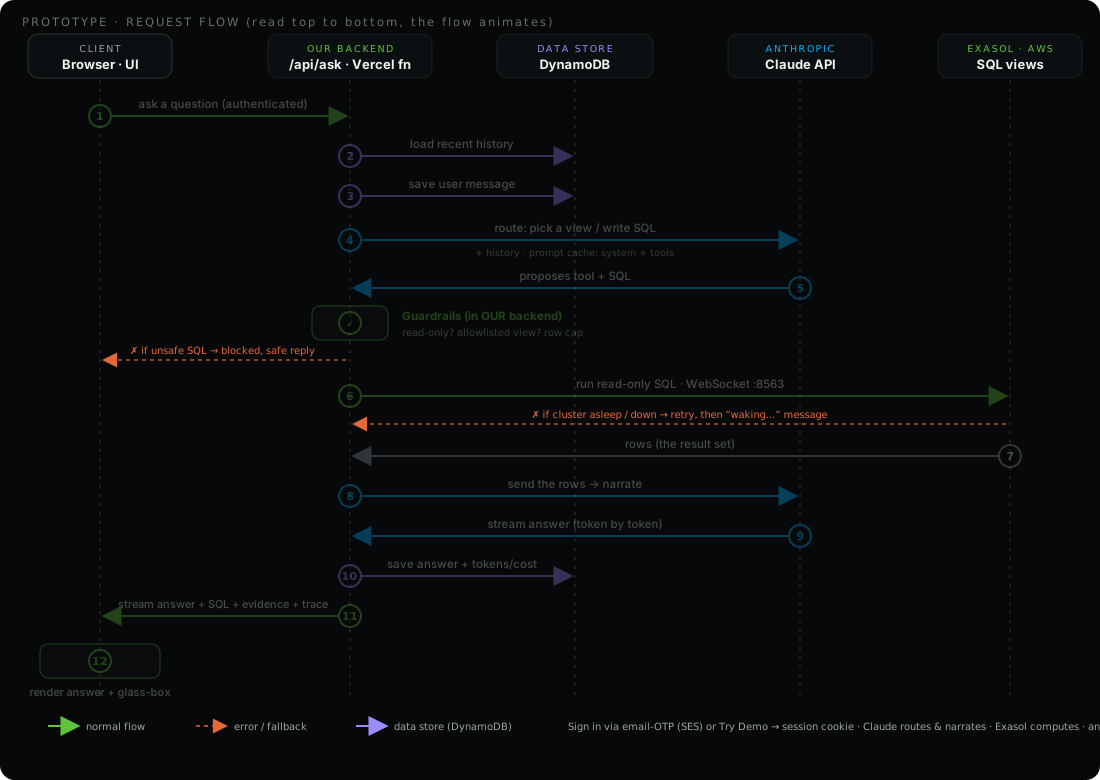
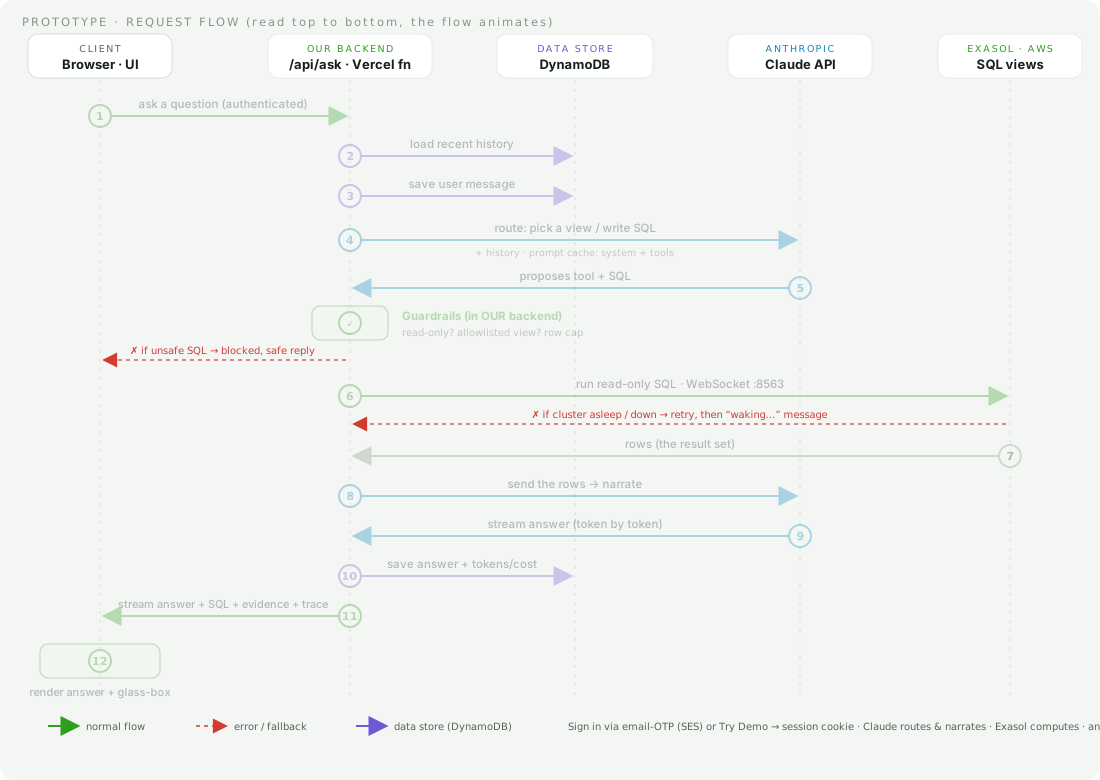
Flow: 1 browser POSTs the question -> 2 the LLM routes it to one Exasol view -> 3 the function runs that read-only SQL -> rows return -> 4 the LLM narrates them -> 5 the UI renders the answer + evidence. All analytics live in Exasol. The LLM only routes & narrates.
One-liner to remember: The truth lives in Exasol. The LLM is a thin translation layer. That's grounded-by-construction, keeps the model cheap/fast, and means anyone can verify an answer by running the same SQL.
Why each choice
- Analytics in SQL views, not in the LLM. Correctness + performance belong in the database. The LLM can't hallucinate a risk score it doesn't compute. Consistent across every question. This is the single most important point to make about Exasol.
- Curated tools (one per view) + a guarded text-to-SQL fallback. The model picks an intent. Exasol returns the truth. The fallback is locked to read-only
SELECTagainst the curatedPLANTOPS.V_*views only. - Evidence shown (SQL + rows) with a copy button. Proves answers aren't hand-waved. The evaluator can paste the SQL into an Exasol worksheet and get the same result.
- Per-request DB connection, Vercel functions are short-lived/serverless, so we open a fresh Exasol WebSocket per request (with retry/backoff for cold-starts). In production you'd use a pooled, long-lived connection.
- Model is configurable (env var), the layer is thin, so a mid-tier model (Sonnet) is plenty. You could even run a local LLM on-prem so plant data never leaves the network.
Full architecture, every component & term
The headline diagram is intentionally the per-question request flow. This section is the complete picture: every service, every term, end to end. The prototype is a real multi-user product, not just the thin demo.
System shape (where everything runs)
- One Next.js app on Vercel. The React frontend (global CDN) and the serverless API (
/api/*functions) deploy together. Live at plant.appili.dev. - Anthropic, Claude (currently
claude-sonnet-4-6) for routing + narration. Model is one env var (ANTHROPIC_MODEL). - Exasol SaaS on AWS. The analytical brain. All metrics live in SQL views (us-east-1, r6id).
- AWS DynamoDB (ap-south-1), the app's data store: conversations, messages, OTP codes, per-message cost.
- AWS SES. Sends the sign-in one-time-passcode emails (sender on the verified
mycv.nowdomain). - Vercel Edge Config + Flags SDK. Feature flags (e.g.
PP_CHAT_HISTORY).
The request flow (the 12 steps in the diagram, in words)
1 Browser POSTs the question to /api/ask with the session cookie. 2 Backend loads recent history (last few turns) from DynamoDB. 3 It saves the user message. 4 It calls Claude with the system prompt + tool definitions + history, asking it to route (pick a curated Exasol view, or write a read-only SELECT). The static system+tools block is served from the prompt cache. 5 Claude responds with a tool_use (tool name + SQL). The backend runs guardrails (read-only? allowlisted view? row cap). 6 It runs the read-only SQL against Exasol over a WebSocket (:8563). 7 Exasol returns the rows. 8 The backend sends the rows back to Claude to narrate. 9 Claude streams the answer token by token. 10 The backend saves the answer + tokens/cost to DynamoDB. 11 It streams the answer + SQL + evidence + trace to the browser. 12 The UI renders the answer and the glass-box trace.
Auth & sessions
- Email OTP (passwordless): user enters email → backend generates a 6-digit code, stores it in the DynamoDB
otptable with a TTL (auto-expiry) → SES emails it → user enters it → backend verifies and issues a signed JWT session cookie (HTTP-only). OTP is the only identity check (no KYC). - Try Demo: an anonymous session (random id, also JWT cookie) so an evaluator gets instant access. Still fully logged.
- super_admin is an allow-list of emails in an env var (
PP_SUPER_ADMIN). It unlocks/admin. - Every
/api/askcall is session-gated: no valid session →401before any LLM cost is incurred.
Persistence (DynamoDB)
plantpulse_conversations, one row per chat (owner, title, totals). A GSIall_by_updatedlets the admin list every conversation by recency.plantpulse_messages, one row per turn. Assistant rows store the answer, suggestions, full trace, evidence rows, model, input/output tokens, cache read/write tokens, costUsd, latencyMs.plantpulse_otp, pending codes, auto-deleted by DynamoDB TTL.- Per message the cost is computed and a running cost rollup is kept on the conversation. Exasol stays strictly read-only. All writes go to DynamoDB (OLTP), never Exasol.
The LLM layer (Claude)
- Agentic tool loop: the backend calls Claude in a loop (max ~4 steps). Claude emits a
tool_use(router), the backend runs the tool and returns atool_result, then Claude narrates. Everytool_usemust get a matchingtool_result(parallel-tool-call safe). - Tools: a set of curated tools (one per Exasol view) plus a constrained
run_readonly_sqlfor questions no curated tool fits. The model never computes analytics. It only routes and narrates. - Adaptive thinking is enabled for models that support it (Opus 4.6/4.7/4.8, Sonnet 4.6) and omitted for others (Haiku). A pure env-var switch.
- Prompt caching: a
cache_control: {type:'ephemeral'}breakpoint on the system+tools block and on the last message. The byte-identical system+tools (~2,150 tokens) is written once and read back at ~10% cost on every later step and turn. Usage reportscache_read_input_tokensandcache_creation_input_tokens. It is a 5-minute prefix cache and is per-model. Observed ~80-87% of input served from cache on follow-ups. The glass box shows a “Prompt cache: X% of input read from cache” step. - Streaming: the narration uses
anthropic.messages.stream(...)withs.on('text', …)thenawait s.finalMessage(), so tokens flow out live. - Multi-model (v2, documented not shipped): a stronger model for reasoning/SQL (small output) + a leaner model for narration (large output). See the Q&A above and
docs/model-strategy.md.
Streaming protocol (NDJSON)
/api/ask returns a ReadableStream of NDJSON (newline-delimited JSON) frames: {type:"text", v:"…"} for each token chunk, then a final {type:"done", conversationId, answer, suggestions, trace, evidence}, or {type:"error"}. The browser reads it with res.body.getReader(), appends text as it arrives, and swaps in the final structured payload on done. Markdown tables “snap in” at the end rather than streaming char-by-char, by design.
Exasol layer
- Analytics live in SQL views (health, risk score 0-100, downtime, repeated errors). Correctness, performance, and auditability belong in the database, not the model.
- Driver:
@exasol/exasol-driver-tsover WebSocket:8563, TLS on. On serverless we open a per-request connection with retry. The cluster auto-stop can cause a cold start, handled with retry and a “waking…” fallback.
Guardrails & grounding
- Read-only SQL only. A view allow-list. A row cap. The exact SQL is shown with the answer. If there are no rows, or the question is out of scope, it says so. Nothing for the model to hallucinate.
Glass-box trace
Every answer carries a trace of typed stages: question → router → exasol → rows → narrator, plus guardrail on a block and a final cache step. The UI animates them and shows the real payload (the SQL, the first rows, the cache %). The same trace is visible per message in the admin transcript.
Frontend
- Next.js App Router (Turbopack), React 19.
AuthGate(email/OTP / Try Demo), the chat UI with a streaming reader, a blinking caret + an animated “thinking” icon, a conversation sidebar, tappable suggestion chips, a live Exasol status pill, a per-answer copy button, a stop-generating control (AbortController on the stream), and SQL syntax highlighting in the glass box. - Grounded charts. When the result suits a visual, the model adds a tiny
CHART: line|bar | x=COL | y=COLdirective (like the suggestions line) and the client draws a small, dependency-free SVG chart (area-line for trends, bars for comparisons) from the evidence rows, never from numbers the model writes. If a named column is missing it falls back to the first numeric column, so it stays correct. A separate risk-comparison chart auto-draws for risk lists. - PDF export. Fully client-side via
jsPDF+jspdf-autotable(dynamic-imported): a branded report with each turn, Markdown tables rendered as real tables, the grounded chart rasterized to an image, pagination, and a clickableplant.appili.devlink. - Theme via CSS variables (dark default + light), and all animations respect
prefers-reduced-motion.
Admin, flags, cost
- /admin (super_admin only) lists every conversation and message, with the same glass-box trace and the cost per message, read straight from DynamoDB.
- Feature flags via Vercel Edge Config + the Flags SDK (discovery at
/.well-known/vercel/flags, gated byFLAGS_SECRET). - Cost per message = input + output priced by model, plus cache reads at 0.1x and cache writes at 1.25x. Logged to DynamoDB and rolled up per conversation.
What is intentionally NOT in the diagram (and why)
The diagram is one flow: the per-question request. Kept out to preserve “one diagram, one story”. (A) separate flows: the OTP login handshake, the admin dashboard, the conversation-list reads. (B) client-only or config: PDF export, the feature flag, the env-var model switch. (C) details folded into a step: suggestions (they ride in the narration), the NDJSON frames (shown as “stream”), history windowing (in “load history”), the cost rollup (in “save answer + tokens/cost”), and Exasol retry and cold-start (the red fallback path).
Proposed production architecture (the on-prem design, every component)
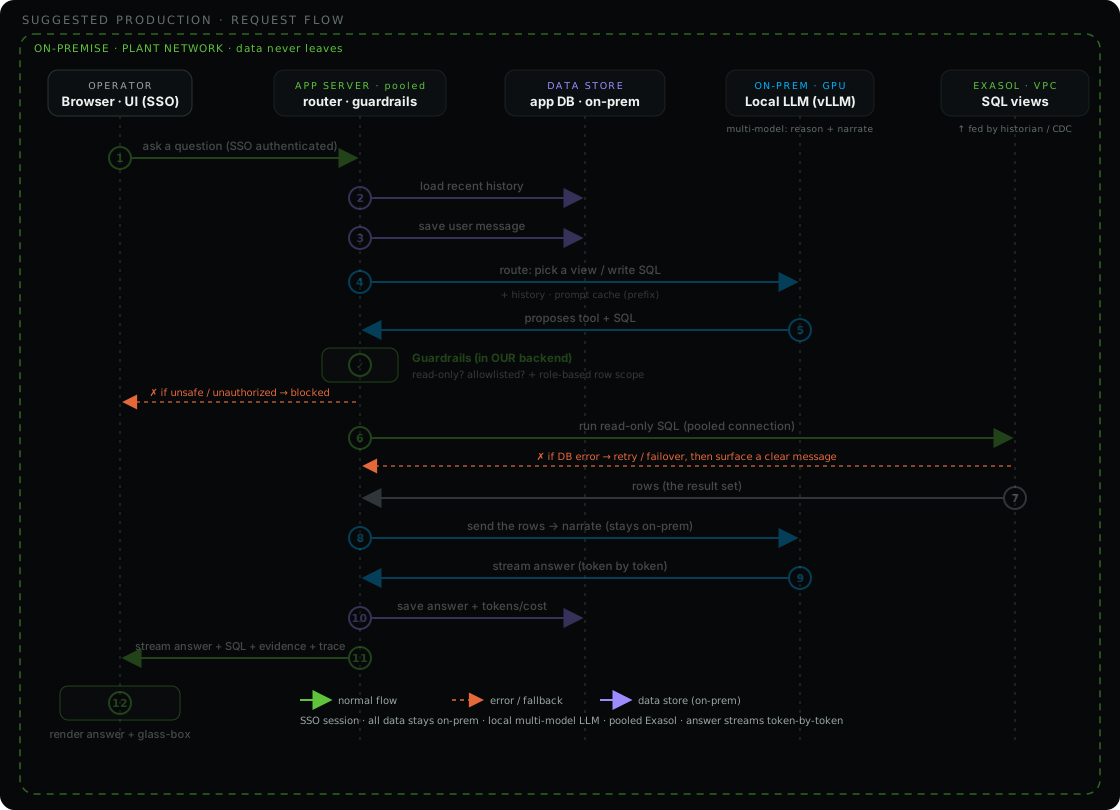
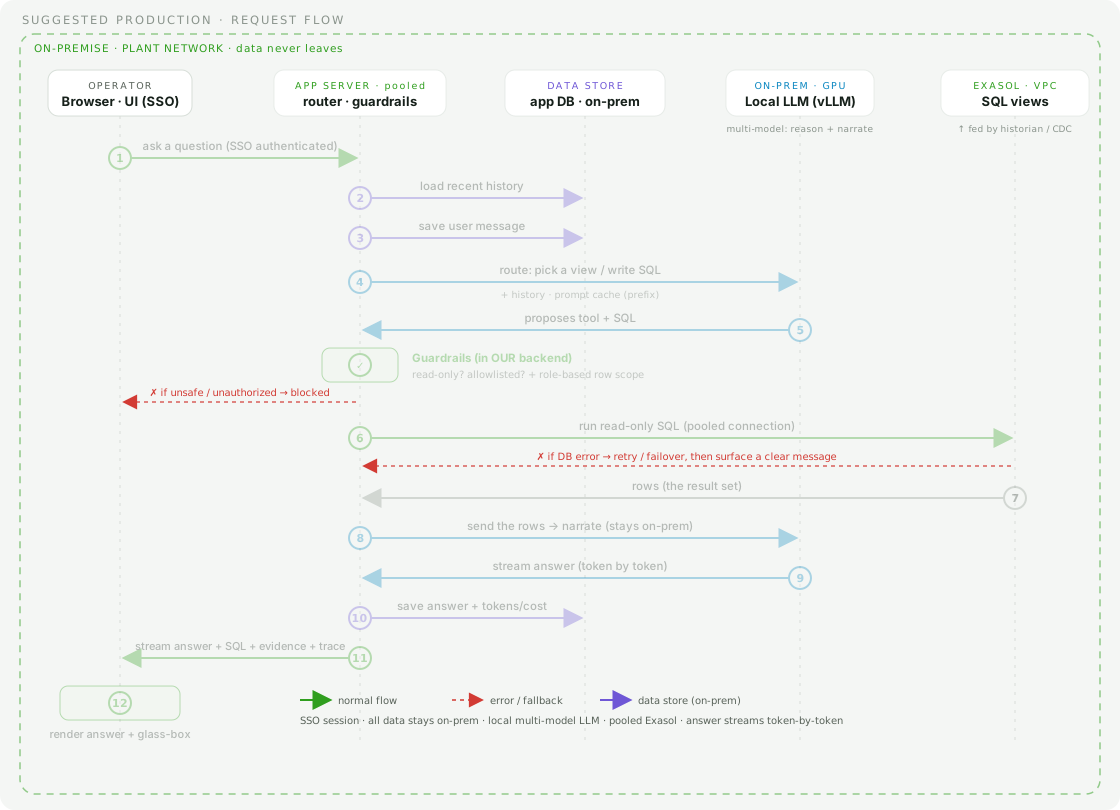
Same shape and the same request flow, different primitives, and one hard rule: data never leaves the plant network. The privacy requirement is the reason to go on-prem, not cost. Component by component:
- On-prem local LLM replaces the Claude API. A self-hosted open-weight model (Llama or Mistral) served by
vLLMon an on-prem GPU, exposing an OpenAI-style API. The assistant layer is thin, so a mid-size local model is enough. Multi-model fits here too: a stronger model for routing and SQL, a leaner one for narration. vLLM does prefix caching, so the prompt-cache win carries over. - On-prem app DB replaces DynamoDB. A relational store (for example Postgres) inside the network holds sessions, conversation history, and the cost and audit log. Same role as DynamoDB in the prototype, just self-hosted.
- SSO and role-based access replace email-OTP. Identity comes from the customer's identity provider, and answers are row-scoped by role and plant so an operator only sees their own scope. That row scope is enforced in the guardrails before the SQL runs.
- Pooled Exasol connections replace the serverless per-request connect. A long-running app server keeps a warm connection pool, so there is no per-request connect and no cold-start lag.
- Exasol in the customer VPC, on-prem or private cloud, fed by the plant historian and CDC instead of mock data. The SQL views keep the same shape, so the assistant code does not change.
- Security and governance: secrets in a vault, network controls (VPC, security groups) instead of an IP allowlist, configurable plant-specific thresholds, alerting and escalation, and auto-scaling or multiple clusters for workload isolation.
Everything above sits inside the dashed on-prem boundary in the production diagram. The browser, the app server, the app DB, the local LLM, and Exasol all run in the customer's network, so no plant data ever touches a third-party API.
Assumptions (this prototype)
What we deliberately simplified for the timebox, state these up front. They show judgement.
- Data is mock/synthetic, realistically generated with planted scenarios (M-102 high risk, Pune downtime, repeated errors), not a real plant historian.
- Time is relative to "now", ~3 weeks of hourly readings up to the present, so "today"/"this week" are computed against the DB clock.
- Risk scoring is a transparent rule-based SQL formula (vibration/errors/downtime/maintenance, fixed weights), chosen for explainability over ML.
- Thresholds are illustrative defaults, HIGH ≥ 60, MEDIUM ≥ 30. Error codes E5xx are treated as "severe".
- Small but sufficient dataset, 3 plants, 6 lines, 18 machines. Enough to demonstrate the concept, not production scale.
- The assistant is intentionally thin, the LLM only routes to the right Exasol view and narrates rows. It answers a focused set of ops questions, not arbitrary NL.
- Read-only, generated SQL is SELECT-only against curated PLANTOPS.V_* views. The assistant cannot change plant state.
- No authentication, open demo. Production would add SSO / role-based access and per-plant scoping.
- Connectivity, Exasol via IP allowlist (0.0.0.0/0 for the demo) + token, over a per-request serverless connection (with retry).
- One Exasol cluster, auto-stop disabled for the eval window (no cold-start). Normally it auto-stops when idle to save cost.
- English-language, manufacturing-operations questions only, out-of-scope questions are politely declined.
- Machine baselines are stored per machine (static), not dynamically recomputed.
Assumptions (production design)
- The customer can host a GPU on-prem (or private cloud) to run the local LLM, sized for the chosen model.
- A self-hosted open-weight model (Llama/Mistral) is good enough for this thin routing+narration task (validated by eval. Smaller models may need a stricter router + prompt tuning).
- Exasol is deployed on-prem or in a private VPC with access to the plant data sources.
- A real-time/near-real-time ingestion pipeline (historian/PLCs/CDC) exists or can be built to feed Exasol, views stay the same shape.
- An identity provider (SSO) + role definitions exist for auth and per-plant scoping.
- Ops capacity exists to run/patch/monitor the on-prem stack (DB, model server, app).
- Security/data-residency policy requires data to stay in-network, the reason for an on-prem LLM over a cloud API.
- Risk thresholds/weights are calibrated with the customer’s engineers, replacing the prototype defaults.
Key decisions & tradeoffs (worth highlighting)
| Prototype choice | Why | Production evolution |
|---|---|---|
| Mock data with planted “stories” | Makes the demo produce real, non-trivial answers | Stream real sensor/historian data (CDC) into Exasol |
| Risk = fixed-weight SQL formula | Transparent, explainable, fast | Configurable thresholds. ML models (possibly via Exasol UDFs) |
| Per-request connection | Fits serverless | Connection pooling / long-lived service |
| Cloud LLM (Claude) | Quality + speed, thin layer | On-prem local LLM for data privacy |
| Single model (Sonnet 4.6) | Right cost, latency and quality fit. Model is one env var. Thin task. | Multi-model: premium model for reasoning/SQL (small output), leaner model for narration (large output) |
| No auth (open demo) | It's a prototype | SSO + role-based access, per-plant scoping |
Exasol concepts you should own
What Exasol is, in one breath: a high-performance analytical (OLAP) database, in-memory, columnar, and MPP (massively parallel processing). It's built for fast analytics on large data using standard SQL. It is not an AI tool, which is exactly why our design puts the analytics in Exasol and keeps the LLM thin.
- In-memory. Hot data served from RAM.
- Columnar. Reads only the columns a query needs. Great compression.
- MPP. Work is split across all nodes and run in parallel.
- Self-optimizing. Auto indexes/statistics, no manual tuning.
- WebSocket protocol via
@exasol/exasol-driver-ts(port8563, TLS). - Personal Access Token as the password (SaaS).
- IP allowlist controls who can reach the cluster.
- Reserved words bit us:
DAY,ROWScan't be column aliases.
1 · What are UDFs & “UDF files”?
UDF = User-Defined Function. Exasol lets you write your own functions in Python, Lua, R, or Java and run them in parallel inside the database, across the cluster nodes. Each UDF script has a run() entry point. When a SELECT uses it, Exasol spins up virtual machines per node and processes the data in parallel, so heavy logic runs where the data is instead of pulling data out to an app.
“UDF files” → BucketFS. UDFs often need extra files, a Python library, a pre-trained ML model, config. Those live in BucketFS, Exasol's distributed file system: you upload a file once and it's automatically replicated to every node, so each parallel UDF instance can read it locally. BucketFS is the only filesystem a UDF can see (sandboxed/chrooted).
“UDFs let me push computation into Exasol, e.g. a Python scoring function running in parallel on every node. The scripts and any libraries or ML models they need are stored in BucketFS, Exasol's distributed filesystem that auto-replicates files to all nodes. In this prototype my risk logic is pure SQL views, but the natural next step for ML-based anomaly detection would be a Python UDF reading a trained model from BucketFS.”
That last line is the money line, it connects UDFs back to our project's production evolution.
2 · What is a cluster?
A cluster is the compute behind an Exasol database, a set of nodes that store data in memory and process queries in parallel (the “MPP” in action). In Exasol SaaS, a database can have one or more clusters. Each cluster is sized (e.g. our XSmall) and can be scaled, auto-scaled (offloading), and auto-stopped when idle to save cost.
- Why multiple clusters? Workload isolation, e.g. one cluster for dashboards, another for heavy loads, all reading the same data, without competing for resources.
- Auto-stop (what bit us): the cluster shuts down after an idle timeout to save money. The next query has to wake it, which causes a cold-start delay/transient connection error. We added connection retry/backoff and, for the demo window, disabled auto-stop so it stays warm.
- Sizing, XSmall = 2 vCPU / 16 GB (our setup). Bigger sizes = more memory + parallelism.
“A cluster is the parallel compute for the database, the nodes that hold data in memory and run queries in parallel. SaaS lets you size it, auto-scale it, and auto-stop it when idle. I disabled auto-stop for the demo so there's no cold-start lag during evaluation.”
3 · Cluster family options, r5d vs r6id
Exasol SaaS runs on AWS, so the “family” dropdown is choosing the underlying AWS EC2 instance family for the cluster nodes. Both r5d and r6id are memory-optimized families with local NVMe SSD (the “d” = local instance storage), a good fit for an in-memory, storage-backed analytics DB.
| r5d (older, 5th gen) | r6id (newer, 6th gen) ✓ | |
|---|---|---|
| CPU | Intel Xeon (Cascade/Skylake) | 3rd-gen Intel Xeon Ice Lake, 3.5 GHz turbo |
| Price/perf | baseline | ~15% better compute price-performance |
| Memory bandwidth | baseline | ~20% higher per vCPU |
| Local NVMe storage | baseline | ~58% more per vCPU, ~34% lower $/TB, up to 7.6 TB |
| Extras | , | always-on memory encryption, up to 50 Gbps net |
Bottom line: r6id is the newer generation and the better default. More memory bandwidth and faster local storage at better price-performance, which matters for a memory- and IO-heavy analytics engine like Exasol. r5d is the older option (pick it only for cost/region reasons). We used r6id.
“Those are AWS EC2 instance families. Both are memory-optimized with local NVMe SSD. R6id is the newer Ice Lake generation, ~15% better price-performance and ~20% more memory bandwidth than r5d, so it's the better fit for an in-memory analytical database. I chose r6id.”
4 · Exasol Worksheets
Worksheets are the browser-based SQL editor built into the Exasol Web Console (both SaaS and the on-prem DB UI). You write and run SQL directly against the database with no external client (no DBeaver, no driver). Think of them as Exasol's answer to Snowflake Worksheets.
| Feature | What it gives you |
|---|---|
| SQL editor | Auto-completion for commands and objects. You can also paste in scripts. |
| Run | Run button or Ctrl/Cmd + Enter executes the statement at the cursor. |
| Multiple worksheets | As many as you want in one database, as named scratchpads. |
| Auto-save | Persist automatically and reopen in another browser or session. |
| Results | Each query result in its own tab, plus an Overview tab summarizing the whole run. |
| Schema browser | Read-only tree of schemas and objects beside the editor. |
The gotcha worth knowing: worksheets run with auto-commit always on. A COMMIT happens after every statement and it cannot be disabled. Great for ad-hoc analysis and exploration, but not for multi-statement transactional work where you want to control commit and rollback (use a real client connection for that).
How it relates to our app: PlantPulse AI connects programmatically via the @exasol/exasol-driver-ts driver, not Worksheets. But a Worksheet is the perfect place to demo the analytics live: open one and run SELECT * FROM PLANTOPS.V_MACHINES_NEEDING_ATTENTION to show the SQL views computing the risk scores, then explain the app is just a thin layer over exactly that.
“Worksheets are the SQL editor in the Exasol web console, so you query the cluster straight from the browser with no client. Auto-complete, multiple saved sheets, a schema browser. One caveat: they are always auto-commit. For the demo I would open a worksheet and run the V_MACHINES_NEEDING_ATTENTION view to prove the analytics happen in Exasol, not in the LLM.”
Evaluation criteria, how this submission maps
The brief lists seven evaluation criteria. Be ready to point to each one concretely.
| Criterion | How this submission addresses it |
|---|---|
| Customer value | A plant manager goes from dashboards and CSVs to direct answers, which machines need attention, why, and the recommended action, in seconds, plus plant/line rollups and trends. One transparent risk score gives consistent prioritization. |
| Use of Exasol | All mock data is loaded into Exasol; every operational signal (health, risk 0-100, downtime, repeated errors, maintenance priority) is computed in Exasol SQL views. The app reads those views over the WebSocket driver and never computes analytics itself. |
| Assistant / agent design | Grounded tool-calling: the model routes to a curated view (or a guarded read-only SELECT), Exasol returns the truth, the model narrates. No unsupported generic text. The glass box shows the exact SQL and rows behind every answer. |
| Problem structuring | A clear star schema, deterministic mock data with planted scenarios, a fixed set of curated views and supported questions, and a defined demo flow. Assumptions stated up front in the README. |
| Practical outcome | A reviewer can see which machine/plant/line needs attention, why (a risk score decomposed into vibration, errors, downtime, maintenance, plus evidence rows), and the recommended action. Charts make trends obvious. |
| Tradeoff thinking | The README and the architecture page lay out what was simplified for the prototype and the production evolution: on-prem LLM (data never leaves), pooled connections, SSO + per-plant scoping, real CDC ingestion, multi-model routing. |
| Responsible AI / guardrails | Read-only only, view allowlist, row cap, all validated in the backend rather than trusted to the model; the SQL is shown with the answer; on no rows it says so instead of inventing an answer. |
Likely questions, crisp answers
Foundations (most likely openers)
Explain the architecture, where's the frontend and backend, and how is AI used?
It's one Next.js app deployed on Vercel, but it has a clear front/back split:
- Frontend = the React UI that runs in the browser, the chat box, risk badge, Exasol evidence panel, and the glass-box trace.
- Backend = Next.js API routes (
/api/ask,/api/health) that run as Vercel serverless functions (Node runtime), server-side. - Flow: browser →
POST /api/ask→ the function talks to Exasol (WebSocket) and Claude (Anthropic API) → returns{answer, trace, evidence}→ the UI renders it.
How AI is used (thin & server-side): Claude does two narrow jobs, (1) route: read the question + a catalog of tools and pick the right Exasol view. (2) narrate: turn the rows Exasol returns into plain English. It does not compute analytics, Exasol's SQL views do. The AI calls happen only in the backend function (the API key never reaches the browser), and the model is constrained to read-only, grounded answers.
Why did we use Vercel?
Vercel is the native home for Next.js (same company), so the frontend and the serverless API deploy together as one unit with zero config. Concretely: global CDN for the UI + serverless functions for the API (scale-to-zero, cheap for a prototype), git-connected CI/CD (push → auto build + preview deploys), and automatic HTTPS + custom domains. Which is how we got a polished shareable live URL fast. Honest tradeoff: Vercel functions are short-lived, so we open a per-request Exasol connection (with retry). A long-running backend would let us pool connections, a fair production change.
Could this run on AWS instead? (system design)
Yes, and AWS is already under the hood: Exasol SaaS runs on AWS (our cluster is on EC2 r6id in us-east-1), and Vercel itself runs on AWS. To build it explicitly on AWS, the mapping is clean:
- Frontend → S3 + CloudFront (static), or AWS Amplify.
- Backend/API → API Gateway + Lambda (like Vercel functions), or ECS/Fargate/EC2 for a long-running server (which enables connection pooling).
- Exasol → SaaS (already AWS), or Community Edition on EC2 / via AWS Marketplace, placed in a private VPC subnet.
- LLM → Anthropic API, or Claude on Amazon Bedrock to keep everything inside AWS (good for enterprise/compliance).
- Secrets → AWS Secrets Manager / SSM instead of env vars. networking → VPC + security groups instead of an IP allowlist.
So the design is portable: same layers (UI → API → Exasol + LLM), different primitives. Vercel just gave the fastest path to a live demo.
Deeper questions
Why Exasol and not Postgres / a normal database?
Exasol is a purpose-built analytical engine, in-memory, columnar, MPP, so aggregations over sensor history (rolling averages, error counts, downtime rollups) are fast and scale. A transactional DB like Postgres is optimized for row-level OLTP, not this kind of analytical scan-and-aggregate workload.
Why Exasol over Snowflake?
Honest framing first: Exasol was the platform for this challenge, but it's a genuinely good fit, and here's a credible comparison:
- Exasol = speed. In-memory, columnar, shared-nothing MPP with a strong optimizer (join-order, cardinality estimation, automated indexing). It returns sub-second results even on complex, many-join analytical models, ideal for a live operational assistant where every "what needs attention now?" should feel instant.
- Deployment flexibility. Exasol runs on-prem, any cloud, or SaaS. Snowflake is cloud-only. For a manufacturer whose plant data may need to stay inside their network, Exasol's on-prem option is a real advantage (same theme as the local-LLM privacy point).
- Be fair to Snowflake. Its strengths are elastic separation of storage & compute (spin virtual warehouses up/down), excellent ease-of-use, and a big ecosystem (Snowpark, data sharing/marketplace), great for massive, variable, multi-team workloads and data sharing with minimal ops.
Where each wins: Snowflake for elastic cloud scale, data sharing, and hands-off ops. Exasol for raw low-latency interactive analytics, price-performance on sustained workloads, and deployment flexibility incl. on-prem. For this use case, fast interactive operational queries, possibly running in a plant's network, Exasol's in-memory speed + on-prem capability are the deciding factors. (Aside: a "snowflake schema" is also just a data-modelling term, don't confuse it with the product.)
How is the assistant “grounded”? What stops it hallucinating?
It can't compute analytics, it can only call a tool backed by an Exasol view, or a read-only SELECT against curated views. Every number in an answer comes from rows Exasol returned, and we display the exact SQL + rows. If there's no data, it says so. So there's nothing for it to invent.
Why put the risk logic in SQL views instead of the app or the LLM?
Three reasons: correctness (one source of truth, no model drift), performance (Exasol does it fast at scale), and auditability (anyone can read/run the SQL). It also keeps the LLM thin and cheap.
Walk me through what happens when I ask a question.
The UI POSTs to an API route. Claude sees the question + a catalog of tools (each = one view) and routes to the right one (or a guarded SQL). We run that against Exasol over a WebSocket connection, get rows back, feed them to Claude to narrate a plain-English answer, and stream the whole trace to the glass-box panel. Read-only throughout.
Would you use UDFs here? Where?
Not for the prototype, rule-based risk in SQL is clearer. For production ML (e.g. vibration anomaly detection), I'd train a model offline, store it in BucketFS, and score in a Python UDF running in parallel on the cluster, keeping the compute next to the data.
How would this scale to real plant data?
Ingest real sensor streams (CDC / historian) into Exasol. The views stay the same shape. Add connection pooling, auth + per-plant access control, configurable thresholds, alerting, and scale the cluster (or add clusters for workload isolation).
Security / responsible-AI?
Generated SQL is single-statement SELECT only. DDL/DML keywords are rejected. Queries are allow-listed to the curated PLANTOPS.V_* views (no base tables, no system tables). There's a row cap. And the SQL is shown before results. The DB user is reachable only via an IP allowlist + token.
What does this cost, and how would you optimise it?
The cluster is the cost, not the AI.
- Exasol, XSmall cluster ≈ $0.83/hr while running. We disabled auto-stop for the demo (so it never cold-starts) ⇒ ~$20/day. Storage ~$25/TB/mo, and we use ~0 TB. This dominates the cost. (Trial gives $200 credit.)
- Claude (Sonnet), ≈ $0.02/question. Pennies, even for a heavy demo.
- Vercel. Serverless, scale-to-zero. No idle cost.
Optimisations: the biggest one is re-enabling Exasol auto-stop after the eval (or pausing the cluster off-hours), pay only for active hours. XSmall is already the smallest size. On the LLM: drop to Haiku (~5× cheaper), add prompt caching (the system prompt + tool defs are static → ~90% off the cached input), or fold route+narrate into fewer calls. In production: auto-scale/schedule clusters around shifts and cache aggressively.
Can you regenerate different mock data easily?
Yes, one command. npm run seed drops + recreates the schema, regenerates the data, and rebuilds the views (idempotent, deterministic, so same data each run). For a different dataset: npm run seed -- --seed 99, a new seed changes all the randomised values while keeping the planted stories (M-102 high risk, Pune downtime, repeated errors) intact. Extension: make plant/machine counts configurable, or have an LLM generate a dataset spec from a natural-language prompt.
Why use Claude's API instead of running your own LLM?
Right tool for a thin, grounded layer on a tight timebox:
- You don't train a foundation model, months + millions of dollars, absurd here. "Own LLM" really means self-hosting an open-weight model (Llama / Mistral / Qwen).
- The API gives best-in-class NL understanding + reliable tool-calling with zero infra, and per-token cost is negligible at this scale (~$0.02/q).
- Our assistant is swappable behind one env var. Not locked in. We can point it at a local model anytime.
If we went on-prem. Host an open-weight model with vLLM / Ollama / TGI (exposing an OpenAI-style API), then point our layer at it. Cost flips to a fixed GPU cost: cloud GPU ≈ $1–4/hr (A10G→A100), or on-prem capex ($10k–40k+/GPU) + power/ops. That only beats the API at very high sustained volume. At this scale the API is cheaper and simpler. The real reason to go local is data privacy. A manufacturer may require plant data never leave their network, not cost. That's the honest answer to “why not your own LLM?”.
Why didn't you wire up “bring-your-own-LLM” in the prototype itself?
A deliberate scope call: (1) timebox. It's a demo, and Claude gives tested, high-quality routing + tool-calling out of the box. (2) I can't reliably test a local model from here, and small open-weight models vary a lot in tool-calling reliability, shipping an untested “use your own LLM” path that might silently break is worse than a clean, working demo. (3) it's a config/adapter change, not a redesign. The assistant is one thin layer, so adding an OpenAI-compatible endpoint (base URL + key) for vLLM/Ollama is a small, well-scoped production task. So: kept Claude for the working demo, and documented the swap rather than shipping it unverified.
Would you use multiple models, a bigger one for reasoning and a smaller one for turning data into text? Or is one model better?
Yes, the app is well suited to it, and I have a clear plan, but I deliberately shipped one model. Every question has two distinct LLM jobs, already separate API calls in my loop: (1) reason / route / write SQL (pick the curated Exasol tool, or generate a read-only SELECT), and (2) narrate (turn the rows into a grounded, formatted answer). Because they are separate calls, they can run on different models with no redesign.
The non-obvious insight: route models by where the tokens are, not by where the task "feels" hard. The intuition is "big model writes the prose." The cost math flips it, because output is the expensive side (Opus output is 5x Sonnet, $75 vs $15 / 1M):
| Step | Output tokens (from real logs) | Cost implication |
|---|---|---|
| Router / SQL reasoning | tiny (~50-150) | premium model here costs almost nothing |
| Narration | large (881, and 1735 on the all-machines answer) | this is where the tokens (and cost) live |
So the cost-optimal split is the opposite of the intuition: premium model on the small-output reasoning/SQL step, leaner model (Sonnet) on the large-output narration step. You pay the premium only where the volume is small. Narration quality still matters (grounding, table formatting, manager tone), so Sonnet is the sweet spot there. Haiku is cheaper but riskier on formatting.
The gotchas I would call out (this is what separates a real answer from a textbook one): (1) extended-thinking blocks are model-specific and signed, so passing one model's thinking blocks to another in history can error. You strip them at the handoff. (2) prompt cache is per-model, so two models means two caches of the system+tools prefix. Still a win, just slightly less efficient. (3) added operational complexity, and the trace should attribute the model per step.
Why I kept one model for the prototype: timebox and risk. It is a small, clean change, but introducing a second model plus the thinking-signature handling right before evaluation adds failure surface for marginal benefit at demo volume. The model is a pure ANTHROPIC_MODEL env var, so switching to Opus, or splitting per role, is a config/adapter change documented as a v2, not a redesign. The strongest engineering answer is judgment, not "I used the biggest model."
"There are two LLM jobs here: reason-and-route, and narrate. They are separate calls, so I can run them on different models. The trick is that narration is the large-output step, so the cost-optimal move is the premium model on the small-output reasoning step and a leaner model on narration, the opposite of the obvious split. I kept a single model for the demo because it is the right cost/latency/quality fit and the model is one env var, and I documented the multi-model split with its gotchas as a v2."
The plant already stores data in an operational DB (say MongoDB). Do you move it into Exasol, or does Exasol query the source directly?
For the analytical hot path you ingest into Exasol, you do not query the operational DB live. Exasol is an in-memory, columnar, MPP analytical engine, so its speed only applies to data it actually holds. MongoDB is operational (document / OLTP) and is not built for the aggregation-heavy scans this assistant needs (rolling averages, error counts, downtime rollups), and you also do not want interactive analytics loading the production OLTP. So you stream and batch the operational data into Exasol and run the curated views on that copy.
How: event-driven CDC for freshness (for MongoDB, for example Debezium, usually via Kafka or Kinesis into Exasol in micro-batches) plus periodic batch loads (Exasol IMPORT or an ELT orchestrator) for history. The operational DB stays the system of record, Exasol is the analytical layer on top, and the views keep the same shape. Federation is possible but not the hot path: Exasol supports Virtual Schemas (and IMPORT / UDF connectors) to query an external source in place, which is fine for an occasional join to a small reference table, but for the core analytics you ingest, because federation gives up the in-memory advantage and is bound by the source's speed. This is also the "data never leaves" story: run Exasol on-prem or in the customer VPC and ingest into it. In the prototype, the seed script plays the role of that ingestion pipeline; production swaps it for real CDC and historian ingestion.
"Exasol is the analytical copy, fed by event-driven CDC plus batch from the operational systems. We don't query MongoDB live for analytics. That gives up Exasol's in-memory speed and would load the OLTP system. Virtual Schemas are there for ad-hoc federation, but the hot path is ingestion."
Did you use Community Edition? Does the docker-compose work?
I built and ran everything on the Exasol SaaS trial (XSmall, us-east-1), which gave a realistic cloud setup and a shareable live demo fastest. I included a docker-compose for Community Edition as a reproducibility convenience, using the official exasol/docker-db image. The code path is identical either way (same driver, same schema.sql / views.sql / seed.ts), so it is a config swap (EXASOL_HOST + EXASOL_TLS_VERIFY=false). I developed on SaaS, so I would call CE a documented path rather than one I exercised end to end. That database portability is exactly the production story: the same app runs on SaaS, CE, or on-prem, which is how "data never leaves the network" becomes a config change, not a rewrite.
What was hard / what would you improve?
Cold-start on the auto-stopped cluster (fixed with retry + disabling auto-stop for the demo). Handling parallel tool calls correctly (every tool_use needs a matching tool_result). And Exasol reserved words (DAY, ROWS) as aliases. Next: connection pooling, streaming responses, and an in-app data browser.
Glossary, full forms + one-liners
Be ready to expand any acronym you use and say what it means in one sentence.
| Term | Stands for | What it means (here) |
|---|---|---|
| OLTP | Online Transaction Processing | Databases tuned for many small reads/writes (inserts, updates), i.e. operational systems like Postgres or MongoDB. Not built for heavy analytical scans. |
| OLAP | Online Analytical Processing | Databases tuned for analytical queries over large data (aggregations, scans, rollups). Exasol is OLAP. |
| MPP | Massively Parallel Processing | The engine splits a query across many nodes/cores that run in parallel, so big scans and aggregations finish fast. |
| Columnar | (column-oriented storage) | Stores data by column rather than by row, so analytical queries that touch a few columns over many rows are fast and compress well. |
| In-memory | (RAM-resident) | Keeps the working data in RAM instead of on disk, for very low query latency. |
| ETL / ELT | Extract, Transform, Load / Extract, Load, Transform | The process of moving data from source systems into an analytical store, transforming it before or after loading. |
| CDC | Change Data Capture | Streaming each insert/update/delete from a source DB as an event, so a downstream store (Exasol) stays continuously in sync. |
| UDF | User-Defined Function | Custom code (e.g. Python/Java) that runs inside Exasol, in parallel on each node, for logic SQL alone can't express (e.g. ML scoring). |
| BucketFS | (Exasol's bucket file system) | Exasol's distributed filesystem that stores scripts, libraries, and models and auto-replicates them to every node (used by UDFs). |
| LLM | Large Language Model | The AI model (here, Claude) that interprets the question and narrates the rows. It does not compute analytics. |
| RAG | Retrieval-Augmented Generation | Feeding a model retrieved facts so it answers from real data, not memory. Our grounding (tool + rows) is the same idea, backed by Exasol. |
| NDJSON | Newline-Delimited JSON | A stream of JSON objects, one per line; used to stream the answer token by token from the API to the browser. |
| JWT | JSON Web Token | A signed token stored in a cookie that represents the logged-in session. |
| OTP | One-Time Passcode | A short code emailed for passwordless login. |
| SES | (AWS) Simple Email Service | The AWS service that sends the sign-in code email. |
| GSI | Global Secondary Index (DynamoDB) | An extra index that lets you query a table by a non-primary attribute (here, list conversations by recency). |
| TTL | Time To Live | An expiry timestamp; DynamoDB auto-deletes the row after it (used for OTP codes). |
| SSO | Single Sign-On | Logging in once through the company identity provider. The production auth path (vs email-OTP in the prototype). |
| VPC | Virtual Private Cloud | An isolated private network inside a cloud provider, used in the "data never leaves" production design. |
| vLLM | (open-source LLM inference server) | A high-throughput server for running open-weight models locally, the on-prem LLM option in production. |
| WebSocket | (persistent connection protocol) | A long-lived two-way connection; the Exasol TypeScript driver talks to the database over it on port 8563. |
Our app specifics (be able to recite)
Data
3 plants (Hyderabad, Pune, Chennai) · 6 production lines · 18 machines · ~3 weeks of hourly sensor readings (~9,000 rows) · error logs · downtime events · maintenance records. Star schema (dims + facts).
The explainable risk score (0–100)
| Component | Max | Basis |
|---|---|---|
| Vibration | 40 | % over the machine's baseline |
| Errors (24h) | 30 | severe (E5xx) ×8, others ×3 |
| Downtime (7d) | 20 | 1 pt per 15 downtime-minutes |
| Maintenance | 10 | overdue = 10 |
Bands: HIGH ≥ 60 MEDIUM ≥ 30 LOW < 30. Star machine M-102: vibration ~+32%, 4 severe errors → HIGH (~65).
Planted demo stories
- M-102 (Hyderabad), rising vibration + 4 severe E5xx errors → the HIGH-risk headline.
- Pune Plant. Bad downtime week (~540 min) → top for “most downtime”.
- M-107 / M-115. Same error code repeated all week → repeated-error detection.
- M-110. Maintenance overdue → maintenance-driven risk.
Stack recap
Next.js 16 (App Router, all-TypeScript) · Vercel · Exasol SaaS (XSmall, r6id, US-East) · @exasol/exasol-driver-ts (WebSocket) · Anthropic SDK (model configurable). Live: ops-ai.appili.dev.
Commands & terminal reference
Run from the project folder (/Users/krishna/exasol-plant-ops-assistant). Node 22 auto-selects via .nvmrc (nvm use). Arguments after -- are passed to the script.
| Command | What it does |
|---|---|
npm run dev | Start the app locally at http://localhost:3000. |
npm run build | Production build (compiles and type-checks the whole app). |
npm run start | Serve the production build locally. |
npm run lint | Run ESLint over the codebase. |
npm run seed | Create the schema, load the mock data, build the 12 views, and print the demo signals. Destructive: drops and recreates the schema each run. Add -- --seed N for a different dataset (planted stories preserved). |
npm run exasol:ping | Quick Exasol connectivity check (wakes the cluster if auto-stopped). |
npm run ask -- "<question>" | Run the full assistant (route → Exasol → narrate) from the CLI, no UI or auth. e.g. npm run ask -- "Why is M-102 high risk?" |
npm run sql -- "<SELECT …>" | Run an ad-hoc query against Exasol. e.g. npm run sql -- "SELECT * FROM PLANTOPS.V_PLANT_HEALTH" |
npm run peek | Quick overview of the loaded data (row counts and key signals). |
Shell shortcuts (functions in ~/.zshrc) run from any directory. Each quietly cd's into the project, switches to Node 22, and runs, without changing your current folder:
exa-ping                 # connectivity check
exa-seed                 # reseed (same deterministic demo data)
exa-seed --seed 99       # reseed a DIFFERENT dataset (stories preserved)
exa-peek                 # quick data overview
exa-ask "Why is M-102 high risk?"                       # assistant end-to-end
exa-sql "SELECT * FROM PLANTOPS.V_PLANT_HEALTH"          # read data
exa-sql "UPDATE PLANTOPS.MACHINES SET VIBRATION_BASELINE=3.2 WHERE MACHINE_ID='M-102'"  # alter
Always qualify objects as PLANTOPS.<name>, the connection opens no default schema. No-terminal option: the Exasol console's “Run SQL” editor in the browser.
Deploy / ops (out of band). Live app on Vercel; source of truth on Bitbucket; public submission mirror on GitHub. Re-seed before a demo so "today / this week" is current, and the first query wakes an auto-stopped SaaS cluster.
Sources
Notes for the Exasol task · regenerate/extend as you study.